Submoney icon Submoney
Submoney vs Hiatus

A Hiatus alternative that works without linking your bank

Compare Hiatus and Submoney for subscriptions, recurring payments, required balance, calendar visibility, widgets, and platform fit.

Last reviewed

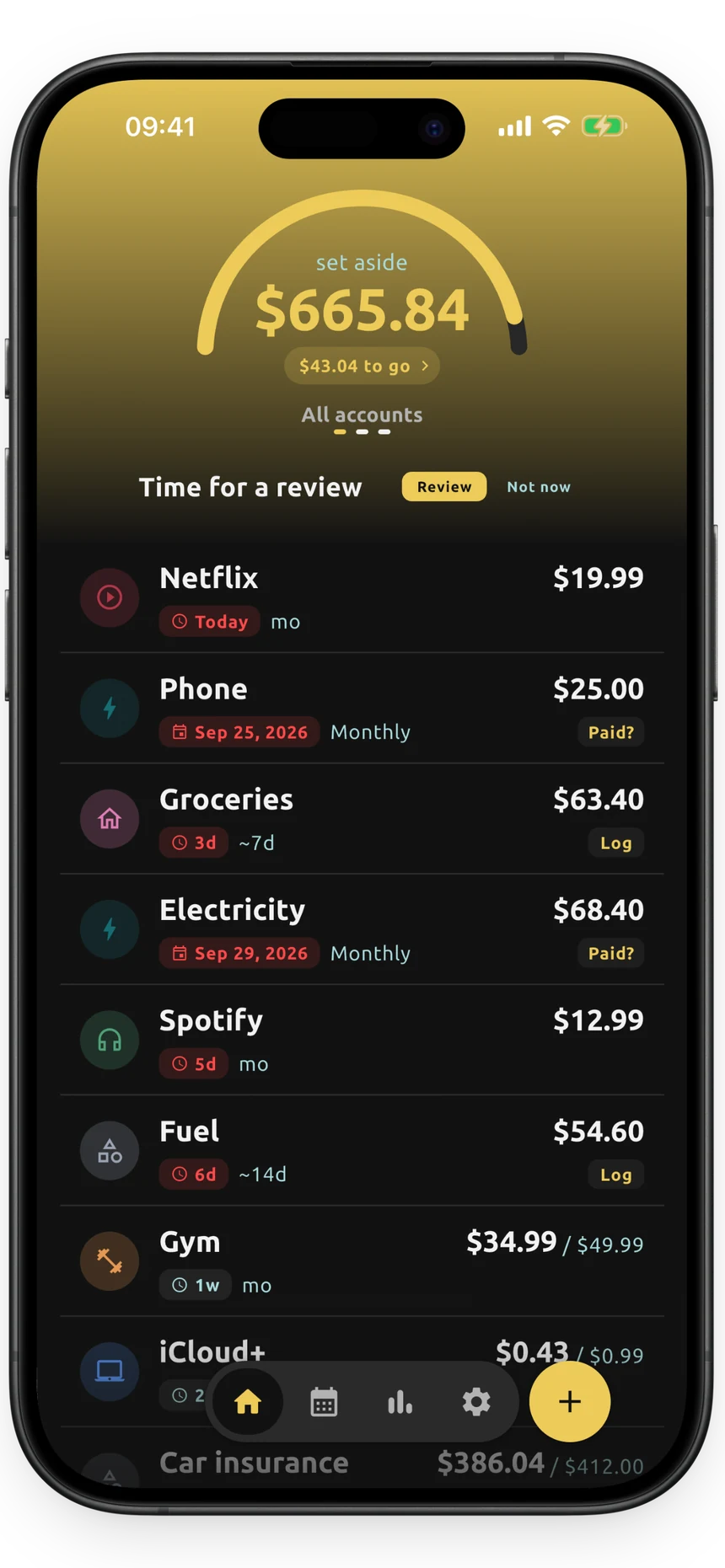
Submoney app home screen
The short version

Use Submoney to track recurring payments by hand and see the balance they need. Use Hiatus for bank-linked subscription detection, cancellation help, and bill negotiation.

How they differ

Hiatus links your bank account to find subscriptions and bills. It alerts you about upcoming charges and price increases, and offers cancellation and bill negotiation services.

Submoney skips bank access. You add recurring payments yourself and see how much to keep in your bank for them.

Which one should you pick?

Choose Submoney if…

  • You want to know the exact balance to keep in your bank today for upcoming charges.
  • You prefer adding payments by hand instead of connecting your bank.
  • You want subscriptions, trials, and fixed-date bills in one focused list.
  • You want a free plan, and a one-time purchase instead of another subscription.

Choose Hiatus if…

  • You want subscriptions found from your bank account.
  • You want someone to cancel subscriptions for you.
  • You want help negotiating bills.

Feature comparison

A practical look at what each app is best suited for.

Focus

Submoney Focused recurring-money tracker for the exact balance to keep in your bank.

Hiatus A subscription and bill manager with cancellation and negotiation services.

Setup style

Submoney Manual setup, built around subscriptions, trials, bills, and recurring payments. No bank connection.

Hiatus Links your bank account to find subscriptions and bills.

Subscription tracking

Submoney Tracks subscriptions, bills, recurring expenses, variable payments, and trial periods, with a periodic keep-or-cancel review.

Hiatus Finds subscriptions from bank data and alerts you about price increases.

Daily required balance

Submoney Shows the daily required bank balance for upcoming recurring money, and what you have set aside per account.

Hiatus Includes budgets and spending insights, not a daily required balance for recurring payments.

Calendar/upcoming payments

Submoney Includes payment calendar views for upcoming charges.

Hiatus Sends alerts for upcoming charges.

Widgets

Submoney Includes home screen widgets for required balance and upcoming payments.

Hiatus Not highlighted in Hiatus's official listing.

Platform fit

Submoney An iPhone app for people who want a focused subscription balance tracker.

Hiatus Best for people who want a bank-linked service that handles cancellations.

Questions

Is Submoney a good Hiatus alternative?

Yes, if you mainly want to track subscriptions and recurring payments and see how much money to keep in your bank for them. If you need bank-linked subscription detection, cancellation help, and bill negotiation, Hiatus may fit better.

Does Submoney connect to my bank?

No. You add subscriptions, bills, and recurring payments yourself. Your data stays only on your device, nothing is uploaded, and there is no account or login. You can back up or move it with JSON export and import.

Is Submoney free?

Yes. The free plan tracks up to 15 items with reminders, the payment calendar, and widgets. Submoney Plus is a one-time purchase that unlocks unlimited items, full analytics, price history, and export and backup.

Is Submoney available on Android?

Not at the moment. Submoney is available for iPhone on the App Store.

Try Submoney after comparing Hiatus

Use Submoney when the question is not only when a payment renews, but how much money should stay ready for it.

Other comparisons

Considering a different app? See how it compares.

Submoney vs Rocket Money

Budgeting and subscription management - Mobile and web finance app

Use Submoney to see exactly what to keep in your bank for recurring payments, with no bank link. Use Rocket Money for bank-linked budgeting and cancellation help.

Read comparison

Submoney vs Monarch

All-in-one money management - Web, iOS, and Android

Use Submoney for a focused view of recurring money and the balance it needs. Use Monarch for a shared, bank-synced view of your whole financial life.

Read comparison

Submoney vs Copilot Money

Personal finance and budgeting - Personal finance app

Use Submoney when you only need recurring payments and the balance to keep for them. Use Copilot Money for full budgeting, cash flow, and investments.

Read comparison

Submoney vs Bobby

Subscription tracker - iPhone

Both are manual trackers. Use Submoney if you also want the required balance, bills, and set-aside money. Use Bobby for a simple iPhone subscription list.

Read comparison

Submoney vs Tilla

Android subscription manager - Android

Both track subscriptions by hand. Use Submoney for the balance to keep, bills, and set-aside money on iPhone. Use Tilla if you are on Android and want a subscription manager.

Read comparison

Submoney vs Chronicle

Bill organizer - iPhone, iPad, and Mac

Both work without a bank link. Use Submoney for subscriptions, trials, and the exact balance to keep. Use Chronicle for long-running bill organizing across iPhone, iPad, and Mac.

Read comparison

Submoney vs Subby

Subscription tracker - Android and iPhone

Both are private, manual trackers with a one-time upgrade. Use Submoney for the daily required balance, bills, and set-aside money. Use Subby for a simple tracker with a large logo library.

Read comparison

Submoney vs ReSubs

Subscription manager - iPhone and Android

Both track subscriptions without a bank link. Use Submoney for the daily required balance and a one-time upgrade. Use ReSubs for Gmail and screenshot import and cancel guides.

Read comparison

Submoney vs YNAB

Zero-based budgeting - iPhone, Android, and web

Use Submoney if you only need recurring payments and the balance to keep for them. Use YNAB if you want a full zero-based budgeting system for every dollar.

Read comparison

Submoney vs PocketGuard

Budgeting and bills - iPhone, Android, and web

Use Submoney to see the exact balance to keep for recurring payments, with no bank link. Use PocketGuard for bank-linked budgeting that shows what is safe to spend.

Read comparison

Submoney vs Emma

Budgeting and money app - iPhone, Android, and web

Use Submoney to track recurring payments by hand, anywhere, and see the balance they need. Use Emma for UK open-banking budgeting with subscription detection.

Read comparison