How they differ
Bobby is a focused iPhone app for manually tracking subscriptions, fixed costs, upcoming bills, and due-date notifications.
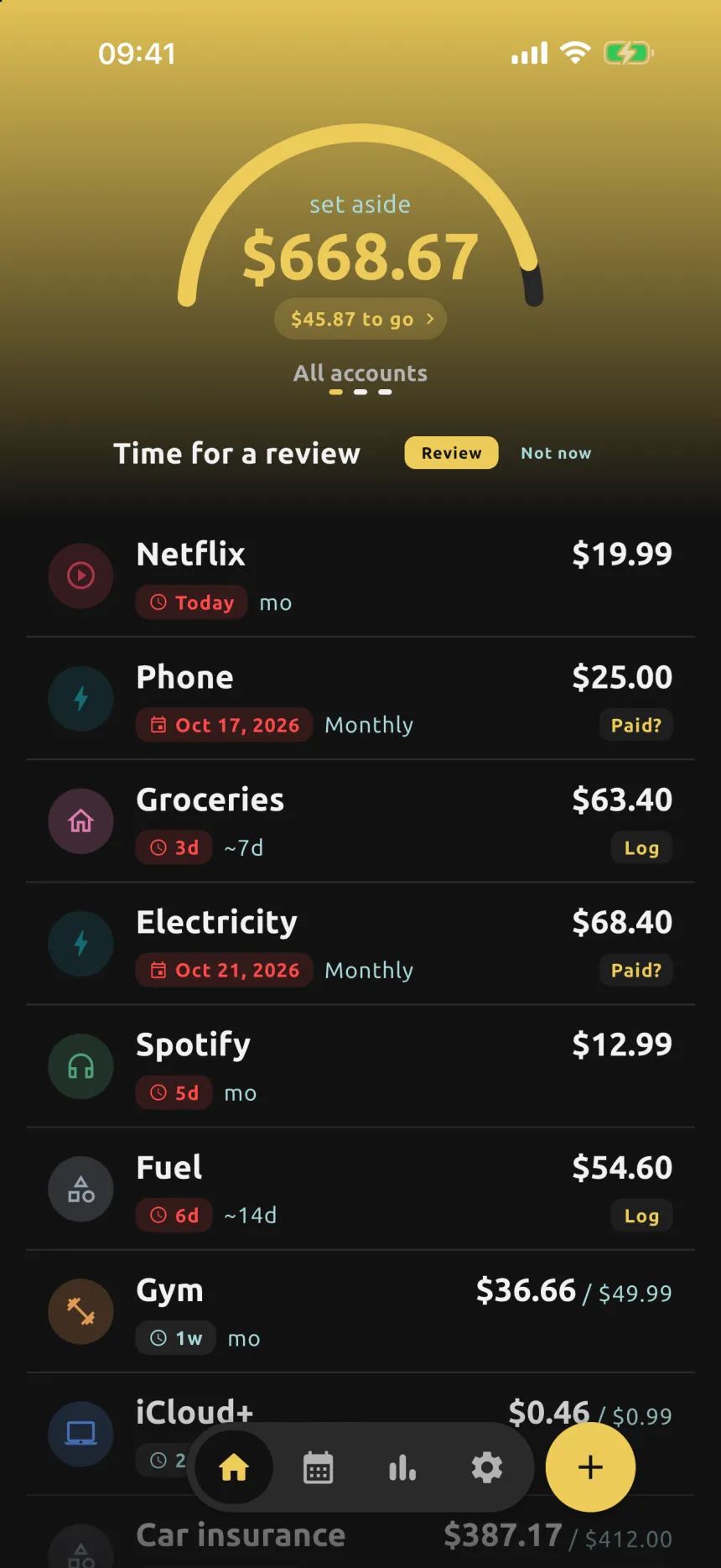
Submoney adds the bank-balance lens: not just what renews, but how much to keep available.
 Submoney
Language
No matching languages
Compare Bobby and Submoney for subscriptions, recurring payments, required balance, calendar visibility, widgets, and platform fit.
Last reviewed
Both are manual trackers. Use Submoney if you also want the required balance, bills, and set-aside money. Use Bobby for a simple iPhone subscription list.
Bobby is a focused iPhone app for manually tracking subscriptions, fixed costs, upcoming bills, and due-date notifications.
Submoney adds the bank-balance lens: not just what renews, but how much to keep available.
A practical look at what each app is best suited for.
Submoney Focused recurring-money tracker for the exact balance to keep in your bank.
Bobby A dedicated app for subscriptions, fixed costs, upcoming bills, and reminders.
Submoney Manual setup, built around subscriptions, trials, bills, and recurring payments. No bank connection.
Bobby Manual entry from existing subscriptions or custom subscription records.
Submoney Tracks subscriptions, bills, recurring expenses, variable payments, and trial periods, with a periodic keep-or-cancel review.
Bobby Tracks subscriptions and helps show upcoming bills and total subscription spending.
Submoney Shows the daily required bank balance for upcoming recurring money, and what you have set aside per account.
Bobby Shows what is due and total spending, but not a dedicated daily required-balance view.
Submoney Includes payment calendar views for upcoming charges.
Bobby Shows upcoming bills and sends notifications when a bill is due.
Submoney Includes home screen widgets for required balance and upcoming payments.
Bobby Not highlighted in Bobby's official listing.
Submoney An iPhone app for people who want a focused subscription balance tracker.
Bobby Best for iPhone users who want a clean subscription-only utility.
Yes, if you mainly want to track subscriptions and recurring payments and see how much money to keep in your bank for them. If you need a minimal iPhone subscription list with reminders, Bobby may fit better.
No. You add subscriptions, bills, and recurring payments yourself. Your data stays only on your device, nothing is uploaded, and there is no account or login. You can back up or move it with JSON export and import.
Yes. The free plan tracks up to 15 items with reminders, the payment calendar, and widgets. Submoney Plus is a one-time purchase that unlocks unlimited items, full analytics, price history, and export and backup.
No. Submoney is available only for iPhone, on the App Store. There is no Android version.
Use Submoney when the question is not only when a payment renews, but how much money should stay ready for it.
Considering a different app? See how it compares.
Budgeting and subscription management - Mobile and web finance app
Use Submoney to see exactly what to keep in your bank for recurring payments, with no bank link. Use Rocket Money for bank-linked budgeting and cancellation help.
Read comparisonAll-in-one money management - Web, iOS, and Android
Use Submoney for a focused view of recurring money and the balance it needs. Use Monarch for a shared, bank-synced view of your whole financial life.
Read comparisonPersonal finance and budgeting - Personal finance app
Use Submoney when you only need recurring payments and the balance to keep for them. Use Copilot Money for full budgeting, cash flow, and investments.
Read comparisonAndroid subscription manager - Android
Both track subscriptions by hand. Use Submoney for the balance to keep, bills, and set-aside money on iPhone. Use Tilla if you are on Android and want a subscription manager.
Read comparisonBill organizer - iPhone, iPad, and Mac
Both work without a bank link. Use Submoney for subscriptions, trials, and the exact balance to keep. Use Chronicle for long-running bill organizing across iPhone, iPad, and Mac.
Read comparisonSubscription tracker - Android and iPhone
Both are private, manual trackers with a one-time upgrade. Use Submoney for the daily required balance, bills, and set-aside money. Use Subby for a simple tracker with a large logo library.
Read comparisonSubscription manager - iPhone and Android
Both track subscriptions without a bank link. Use Submoney for the daily required balance and a one-time upgrade. Use ReSubs for Gmail and screenshot import and cancel guides.
Read comparisonSubscription and bill manager - iPhone, Android, and web
Use Submoney to track recurring payments by hand and see the balance they need. Use Hiatus for bank-linked subscription detection, cancellation help, and bill negotiation.
Read comparisonZero-based budgeting - iPhone, Android, and web
Use Submoney if you only need recurring payments and the balance to keep for them. Use YNAB if you want a full zero-based budgeting system for every dollar.
Read comparisonBudgeting and bills - iPhone, Android, and web
Use Submoney to see the exact balance to keep for recurring payments, with no bank link. Use PocketGuard for bank-linked budgeting that shows what is safe to spend.
Read comparisonBudgeting and money app - iPhone, Android, and web
Use Submoney to track recurring payments by hand, anywhere, and see the balance they need. Use Emma for UK open-banking budgeting with subscription detection.
Read comparison